


4.5 out of 5
Customer Reviews
By
Duane P
Date: November 07, 2025
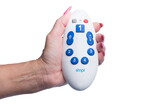
Have a family member with some vison and cognitive issues... So I had to simplify the remote. After finding the right code(s) it works awesome. They can switch between the 5 channels they usually watch and control the TV as needed (volume, mute, power). I had to program this twice because cable box was replaced. It can be frustrating but ended up well worth the effort. Normal remotes from cable companies have way too many buttons and are almost impossible to read . This remote allows for frustration free TV access to people that might otherwise be overwhelmed by standard remotes.
Rating:  [5 of 5 Stars!]
[5 of 5 Stars!]
By
Rob
Date: July 12, 2025
Programmed mom's 5 favorite channels in. Now she doesn;t butterfinger the cable remote and switch modes. Used a label maker to mark each button. ABC, ESPN, FOX, etc.... Actually just bought her a second one so she can have more than five channels. Wish they made one with 10 buttons.
Rating: [5 of 5 Stars!]
[5 of 5 Stars!]
By
JEB
Date: May 18, 2025
I got this remote for my mother who has dementia- it took me a few times to get the favorite channels programmed but once I figured it out it went smoothly. I also added labels to the volume and channel changer.
Rating:  [4 of 5 Stars!]
[4 of 5 Stars!]
By
Bob H
Date: April 08, 2025
If you follow the directions explicitly, it is very easy to program. It is also easy to operate, even for technophobes, the elderly, and the visually impaired.
Rating: [5 of 5 Stars!]
[5 of 5 Stars!]
By
NC girl
Date: March 29, 2025
Got this for my mom who moved to an assisted living that only provided satellite TV. She has low vision so had to find a simple remote for her to use, and not have to flip through nearly 400 channels. Took a little while to set up, but worked great. You do have to keep trying the codes for the TV and satellite box but eventually one will work. She has a Sceptre brand HDTV and Directv satellite. Was pleasantly surprised--usually stuff doesn't work as advertised, but this remote did.
Rating: [5 of 5 Stars!]
[5 of 5 Stars!]
By
Mike S.
Date: February 03, 2025
Bought this for my 101 year old mother-in-law, and she loves it. But the instructions are not quite complete.For example when setting up for the tv, we found a code that would change the channels, and thought we were done, but that code would not turn the tv off. We needed to continue through the list to find a code that did both.Also, when programming the favorites buttons, we had to press the mute key to get the station to be saved.Those things didn't take a lot of extra time, but they were a nuisance.
Rating: [4 of 5 Stars!]
[4 of 5 Stars!]
By
Anthony M. Alessi
Date: December 23, 2024
I have a mother with dementia and this remote was perfect for her. Was a little hesitant because of some of the bad reviews but took a shot and it worked perfect. My mother is not afraid to touch her remote anymore!
Rating: [5 of 5 Stars!]
[5 of 5 Stars!]
By
A.J.S.
Date: December 11, 2024
There was lag time in programming that was not mentioned. But it works perfectly for my elderly father. He has a LG smart TV.
Rating: [5 of 5 Stars!]
[5 of 5 Stars!]
By
Melch
Date: November 23, 2024
Easy setup
Rating: [5 of 5 Stars!]
[5 of 5 Stars!]
By
CHMM
Date: October 27, 2024
Would be easier if the volume button was 2 separate buttons with arrows pointing up down. Seems to be a lag in pressing the buttons but if you point and hold the button it works. I am pleased with its performance so far, except for the volume button as it does create an issue somewhat. The only other item is registering the product, I have tried twice and have not successfully been able to register it. Would be nice if the information that was required was listed on the registrations sheet but it is not.
Rating: [4 of 5 Stars!]
[4 of 5 Stars!]
By
jacki
Date: May 24, 2024
We bought this for my elderly site impaired mother who only listens to 2 TV stations, but was continually getting her TV all messed up because her original remote is too complicated and small to maneuver. This is a simple 3 step remote. 1 turn on the TV. 2 select one of the 4 channels programed (she only uses two). 3 adjust the volume.... All three steps are completed by using large, easy to use buttons on the remote, with very, very few mistakes on her part. Well worth the cost and time it took to program for her...
Rating: [5 of 5 Stars!]
[5 of 5 Stars!]
By
A Customer
Date: April 25, 2024
Easy to program and works great.
Rating: [5 of 5 Stars!]
[5 of 5 Stars!]
By
LC
Date: March 09, 2024
This is a good solution to the problem of complicated remotes for the elderly.It was easy to set up and easy for the person to use.Eliminated l;lots of problems
Rating: [5 of 5 Stars!]
[5 of 5 Stars!]
By
Ericb
Date: January 13, 2024
Tech support was fast to get a hold of.. but could not get a solution to the issue.. unit will send the channel number sequence but not enter/go. I did find an elderly friendly remote that works with comcast.
Rating:  [1 of 5 Stars!]
[1 of 5 Stars!]
By
Ron
Date: December 15, 2023
Easy to use by my almost 102 yo mom. Great features and she has 5 buttoms for her favorite TV shows.
Rating: [5 of 5 Stars!]
[5 of 5 Stars!]
By
Justin Lee
Date: November 09, 2023
The overall design and idea behind this product are great, but for many, myself included, it has one insurmountable flaw. If you intend to use it with most Comcast/Xfinity boxes, you're simply out of luck. You can program the remote to control some functions with a Comcast Cable box, including channel up and down. However, the favorite buttons, which are the big draw to help elderly navigate to a select few channels out of a sea of hundreds in an ever-increasingly arcane UI from Comcast, simply won't help you. Most Comcast boxes will accept IR codes for almost everything, EXCEPT, the "OK" or "Enter" button. You can use the Smpl remote to program in a favorite for channel and send that command to the cable box, but your Comcast box will sit there, asking for you to confirm, and this remote simply cannot perform the confirmation. My own testing revealed that the "OK" button on the Comcast remote for some strange reason uses radio frequency (Bluetooth?) with the Comcast cable box. Almost every button press must be in line of sight with the original remote, but the OK button can be activated from another room. This implies it's radio frequency, not IR, and IR is simply all the Smpl remote can do. Note to seller/designer: If you can find a solution to this issue, I'll gladly update the review. Product seems so promising and ideal for my needs, except for this one fatal flaw.
Rating:  [3 of 5 Stars!]
[3 of 5 Stars!]
By
Eddie Biggins
Date: August 28, 2023
The fact that my mother's Comcast/Xfinity service requires her to hit the 'enter' button on the original remote precludes the use of this remote. When I programmed the buttons, the channel numbers would come up on the screen, then just sit there waiting for the 'enter' to be pressed. Nice unit, easy to program, but ultimately not useful for us.
Rating: [4 of 5 Stars!]
[4 of 5 Stars!]
By
Kristy
Date: May 07, 2023
The hardest part was convincing mom to try it. As her dementia has progressed, the regular remote was too confusing to her. When she unknowingly ordered channel upgrades, we knew we had to do something.Wish the buttons were labeled better but we just used a label maker.She doesn't watch tv like she used to but at least now she can find her favorite shows.
Rating: [5 of 5 Stars!]
[5 of 5 Stars!]
By
A Customer
Date: April 01, 2023
This is a terrific little remote for my 94 year old grandmother that is visually impaired. It set up perfectly for me within a matter of minutes on a Samsung tv with antenna connection (no set top box). Favorite channel buttons were easily programmed. She pretty much only watches 5 channels (FOX, ABC, CBS, NBC, PBS) so this remote works well for her and is very simple and basic. Exactly what we need!
Rating: [5 of 5 Stars!]
[5 of 5 Stars!]
By
A Customer
Date: March 07, 2023
Bought this for my husband who is visually challenged (legally blind). It's simple operation and large raised buttons make it very easy to operate.
Rating: [5 of 5 Stars!]
[5 of 5 Stars!]